
Cross Runner: Master Narrow Bridges, Jump Landings and Obstacle Timing
Improve Cross Runner with practical bridge alignment, hazard timing, landing checks and smarter coin and key collection routes.
Read article ↗
Choose a driving difficulty in Race Mania and guide a car through traffic on a winding road.
Play here in the browser.
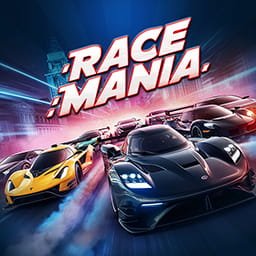 Race Mania
Read the bend beyond the vehicle you want to pass. A gap that looks generous on a straight can narrow as the road curves, making an early, measured manoeuvre easier to manage.
On the winding road, the amount of lane you can see changes around each bend. A pass needs room for both moving out and returning, which is easier to judge when the turn's exit is already visible.
Race Mania puts you behind a vehicle on a three-dimensional road with other traffic. The car advances while you steer left and right to keep a usable path. There is no need to invent a racing line around an unseen circuit: the immediate problem is the road and vehicles visible ahead. Look beyond the nearest car so that an avoidance movement does not lead straight into another occupied part of the road.
On a keyboard, use the left arrow or A to steer left and the right arrow or D to steer right. On a pointer or touch device, hold and move horizontally in the direction you want to steer. Releasing the input straightens the vehicle. This makes the end of a gesture part of the control, not just the beginning. Practise a short steering change followed by release so you can recognise when the car has moved far enough for the gap you chose.
The road boundary matters as much as traffic. Going too far outside the permitted width causes a crash, so an empty-looking strip beside the road is not a safe escape route. Keep enough margin on both sides while assessing approaching vehicles. If you need to avoid something, choose an opening within the roadway and begin early enough to reach it without an extreme last-second movement. Watch the car's direction after the adjustment so that a successful pass does not become an unintended departure from the road.
The game offers difficulty selection and returns to a replay choice after a run ends. Use that choice to establish a control pace you can read before increasing the challenge. A crash is most informative when you identify its cause: contact with traffic, moving outside the road or holding the steering input after the gap was already reached. Work on that cause during the next run. With automatic forward progress, the useful skill is making each horizontal change precise enough to preserve space for the traffic that follows.
Use Left Arrow or A for left, and Right Arrow or D for right.
Release the key or touch/pointer hold; the game then straightens the vehicle.
Moving outside the permitted road width triggers a crash.
Use the game's difficulty selection before beginning the next run.
Found a control that behaves differently? Tell us the game name and your device.

Improve Cross Runner with practical bridge alignment, hazard timing, landing checks and smarter coin and key collection routes.
Read article ↗
Understand camera rotation, layer turns, centers, edges and corners in Cube 3D. Learn reversible moves and plan a standard 3×3 solve step by step.
Read article ↗
Learn the leaf traversal rules, plan flower-planting routes and use Undo to recover from awkward moves in Emoji Puzzle on RobixGame.
Read article ↗
Find exposed matches, clear rising rows and stay below the red line in Pet Merge on RobixGame. Includes a browser check, worked examples and a practi…
Read article ↗