
Cross Runner: Master Narrow Bridges, Jump Landings and Obstacle Timing
Improve Cross Runner with practical bridge alignment, hazard timing, landing checks and smarter coin and key collection routes.
Read article ↗
Line up cannon fire in Cannon Attack and read how the shot interacts with the scene before correcting your aim.
Play here in the browser.
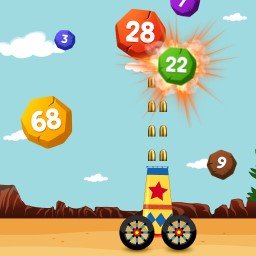 Cannon Attack
Begin by identifying the first obstruction between cannon and target. Correct that part of the route after a miss; changing the final aiming point alone may simply repeat the same early collision.
Cannon Attack places a player cannon against enemy targets that can carry shields. The scene includes bullets, health information and protection effects, so firing is only part of reading the encounter. Begin by locating the current target and noting whether a shield changes the useful line of attack. A shot needs to meet the actual exposed opportunity rather than simply travel toward the centre of a striking-looking object.
Use the visible aiming cue to establish the direction before committing. The game contains swipe-hand and arrow tutorial elements, which provide the relevant introduction to this edition's control. Follow that cue and observe what one deliberate attempt does. If the projectile meets a shield or passes the intended contact point, use that result to refine the next setup. Repeating a shot without checking the target's changed condition can spend effort on a route that is no longer useful.
Health and repair-related information deserve attention between attacks. They describe the current margin and the options shown by the game, while the enemy's position determines the immediate firing decision. Read any repair choice and its displayed requirement before using it. Do not assume that protection is unlimited or that a familiar shield symbol grants the same effect as in another cannon title. Observe the visible change and adjust the next attack accordingly.
The game includes pause, replay and level-up related feedback. Use those transitions to inspect the new target situation instead of carrying the previous aiming rhythm into every encounter. On a phone, leave the cannon's line and the intended contact area visible around the gesture. After an attempt ends, distinguish poor alignment from a shielded approach or a resource decision made too late. That distinction gives another round a concrete objective. A useful cannon sequence connects the cue, the exposed target and the result: prepare the direction, fire deliberately, read the impact and revise the next setup from the scene that remains.
The game includes enemy shields and protection effects, so inspect whether the intended contact is exposed.
Follow the swipe-hand and arrow tutorial cues shown by this installed edition before relying on a remembered control from another cannon game.
Read the visible impact and target condition before deciding whether the same firing line is still useful.
Yes. Health and repair-related elements appear in the game; read the displayed requirements before choosing an available repair option.
The target and protection arrangement may differ, so the previous aiming rhythm should not replace reading the new scene.
Found a control that behaves differently? Tell us the game name and your device.
Improve Cross Runner with practical bridge alignment, hazard timing, landing checks and smarter coin and key collection routes.
Read article ↗
Understand camera rotation, layer turns, centers, edges and corners in Cube 3D. Learn reversible moves and plan a standard 3×3 solve step by step.
Read article ↗
Learn the leaf traversal rules, plan flower-planting routes and use Undo to recover from awkward moves in Emoji Puzzle on RobixGame.
Read article ↗
Find exposed matches, clear rising rows and stay below the red line in Pet Merge on RobixGame. Includes a browser check, worked examples and a practi…
Read article ↗