
Cross Runner: Master Narrow Bridges, Jump Landings and Obstacle Timing
Improve Cross Runner with practical bridge alignment, hazard timing, landing checks and smarter coin and key collection routes.
Read article ↗
Take a ranger through City Warrior's zombie-filled route, using the available attacks to make the next stretch safer.
Play here in the browser.
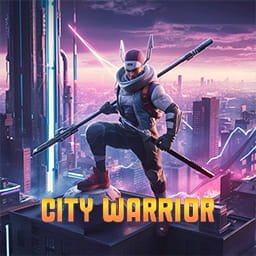 City Warrior
Clear the enemy that blocks a useful position before advancing. Keeping some room around the ranger makes it easier to respond than letting several threats converge on the same small patch of ground.
A zombie near the front of the route can keep the ranger busy while another one approaches. Keeping ground behind the player gives you more room to respond as that second threat enters the path.
City Warrior combines platform movement with ranged combat against ground and flying enemies. The armed character needs room to move as well as a useful firing line. Begin by identifying the nearest enemy, the available ground and the controls introduced by the game. A threat above the character can require a different response from one approaching along the same surface, so read the whole nearby scene before committing to an attack.
The interface includes left, right, jump and shot controls, alongside separate fireball, freeze and lightning actions. Learn those distinct inputs from the information screen and the visible buttons. Movement establishes where the character will stand when an attack happens; firing alone cannot correct an awkward position. Use short movements to create a readable approach, then watch whether the shot reaches the intended enemy. When an enemy remains active, check the line between it and the character before assuming that another identical attack will solve the encounter.
Ammo, life and shield-related objects give pickups different practical meanings. Read the current situation before crossing an exposed area to collect one. An ammunition box addresses a different need from a life pickup, and neither removes the danger on the path to it. The three special attacks also deserve deliberate choices. Observe their visible effect in the current encounter rather than treating every special button as interchangeable. This is especially useful when enemies occupy different heights or approach while you are trying to leave a crowded section.
The city scene includes platforms, buildings and environmental objects that can compete with combat effects for attention. Keep the landing area visible when jumping and check the enemy position again after arriving. On a phone, arrange your grip so movement input does not hide the nearest threat or the available action buttons. When an attempt ends, identify whether the decisive problem was an exposed landing, a poor firing position or a resource decision made too late. That gives the next attempt a clear adjustment. Successful movement and useful attacks support each other: establish space, choose the relevant action and verify what changed before pressing ahead.
The game includes separate fireball, freeze and lightning actions.
Their height changes the firing situation and the movement needed to keep an encounter readable.
Its interface includes left, right, jump and shot controls.
They address different resources, so choose the pickup relevant to the current need and inspect the route to it.
Read the new enemy positions and firing line before continuing the previous attack rhythm.
Found a control that behaves differently? Tell us the game name and your device.



Improve Cross Runner with practical bridge alignment, hazard timing, landing checks and smarter coin and key collection routes.
Read article ↗
Understand camera rotation, layer turns, centers, edges and corners in Cube 3D. Learn reversible moves and plan a standard 3×3 solve step by step.
Read article ↗
Learn the leaf traversal rules, plan flower-planting routes and use Undo to recover from awkward moves in Emoji Puzzle on RobixGame.
Read article ↗
Find exposed matches, clear rising rows and stay below the red line in Pet Merge on RobixGame. Includes a browser check, worked examples and a practi…
Read article ↗