How to Play Magic Block: Number Puzzle Rules and Strategies
An in-depth Magic Block guide with worked row and column sums, constrained-line strategies and practical mistakes to avoid.
Read article ↗
Place numbered tiles in Magic Block so the required row and column totals can work together.
Play here in the browser.
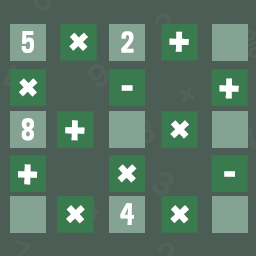 Magic Block
Check both directions before committing a number. A tile that completes one target can make the crossing target impossible, so leave room for the values still needed by the rest of the grid.
In this 3×3 number puzzle, each digit affects both a row and a column. A line with 2 + 3 × 4 is evaluated from left to right here, so the result is 20 and can narrow the options at a crossing cell.
Magic Block is an arithmetic placement puzzle with nine number spaces arranged in a three-by-three square. Fill those spaces using the digits one through nine, with every digit used once. Operators connect the spaces, and target results appear for the three rows and three columns. A solution has to satisfy all six target calculations at the same time; making one row correct is useful only if the crossing columns can still be completed.
This edition calculates each line in order. Work from left to right across a row and from top to bottom down a column, applying the first operation before the second. That differs from automatically performing multiplication before addition. For example, a line containing two plus three followed by multiplication by four is evaluated as five multiplied by four. Read the operators on this board carefully before rejecting a combination that would behave differently under ordinary expression precedence.
Choose a digit from the on-screen number keys, then select the cell where it belongs. The key display tracks digits already used. The zero option clears a cell, which is useful when you need to revise a crossing calculation. When all three cells of a line are filled, its result changes appearance to indicate whether the target matches. A partly empty line does not yet establish a correct or incorrect completed calculation, so use its remaining possibilities rather than treating missing feedback as confirmation.
Start with a row or column whose operators and target restrict the possible digits strongly. Then test its consequences at the intersections. If a proposed centre number makes several crossing lines impossible, reconsider it before filling the corners by guesswork. Keep track of the unused digits as carefully as the arithmetic: six matching targets are not enough if the numbers fail the once-each requirement. The game checks both conditions for completion. A new puzzle option provides another arrangement when you want a fresh challenge, but correcting one conflicting intersection can be more instructive than immediately replacing the board.
Use one through nine exactly once across the nine cells.
No. Each row is evaluated left to right and each column top to bottom, applying the first operation before the second.
Choose the zero option on the on-screen keys, then select the cell you want to clear.
Completion also requires each of the nine digits to be used exactly once.
The game evaluates the line once its three number cells are filled.
Found a control that behaves differently? Tell us the game name and your device.
















An in-depth Magic Block guide with worked row and column sums, constrained-line strategies and practical mistakes to avoid.
Read article ↗
Improve Cross Runner with practical bridge alignment, hazard timing, landing checks and smarter coin and key collection routes.
Read article ↗
Understand camera rotation, layer turns, centers, edges and corners in Cube 3D. Learn reversible moves and plan a standard 3×3 solve step by step.
Read article ↗
Learn the leaf traversal rules, plan flower-planting routes and use Undo to recover from awkward moves in Emoji Puzzle on RobixGame.
Read article ↗