
Cross Runner: Master Narrow Bridges, Jump Landings and Obstacle Timing
Improve Cross Runner with practical bridge alignment, hazard timing, landing checks and smarter coin and key collection routes.
Read article ↗
Keep a table-tennis rally alive in Stickman Table Tennis by meeting the ball and recovering for the next reply.
Play here in the browser.
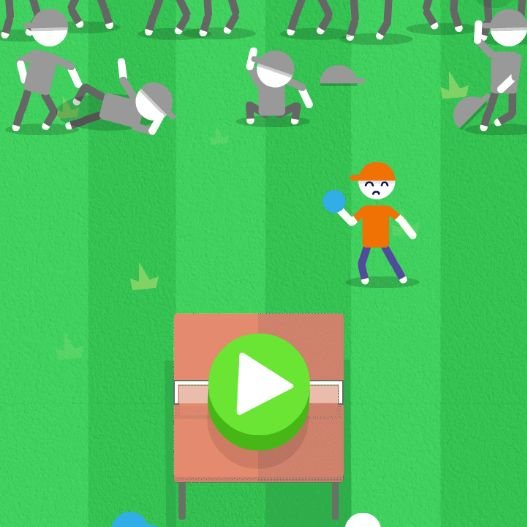 Stickman Table Tennis
Views, plays and likes include starting counts.
Watch the ball after your own return instead of waiting for it to come back. Preparing the player's position early gives the following stroke more room than a late chase toward the edge of the table.
Stickman Table Tennis places a player and opponent on opposite sides of a table, with the ball deciding where attention is needed next. Start through the menu and read the tutorial cue before the rally begins. The first useful lesson is how the player's position responds to your movement. A return requires meeting the ball, but the rally continues after contact. Watch the next path instead of treating a successful touch as the end of the action.
Prepare early for the reply. Once you send the ball across the table, bring the player toward a position that leaves room to reach either side. Following every shot too far toward one edge can make the next response unnecessarily difficult. Track the ball's approach and choose a controlled adjustment rather than chasing its previous location. The table gives you a fixed reference for judging the angle, while the opponent's return changes the immediate space you need to cover.
The game includes a score display and a shop with table or appearance options. Keep those menu choices separate from your reading of the rally: do not assume a visual change provides a mechanical advantage unless the game says so. During play, the important comparison is between the ball's current route and the player's reachable position. If a return misses, identify whether you arrived late, overcommitted to one side or failed to recover after your own shot. Those are more useful observations than simply deciding to move faster everywhere.
On a small screen, keep the ball visible around your hand and use the opening rally to find a comfortable input position. The pause control lets you stop when attention is interrupted. When trying again, improve one response at a time, such as recovering earlier or making a smaller adjustment near the table's edge. A steady rally grows from repeated preparation and contact, not from continuous sweeping movement without a clear target. Watch your own return, read the opponent's reply and make the next position serve the ball's actual approach.
Watch the reply and recover toward a position that leaves room to reach the next shot.
Yes. Follow the opening guidance before judging the first rally.
Only if the game explicitly describes an effect. Visual options alone do not establish a gameplay advantage.
It may carry the player too far toward one edge and leave less time to recover for the following return.
Found a control that behaves differently? Tell us the game name and your device.







Improve Cross Runner with practical bridge alignment, hazard timing, landing checks and smarter coin and key collection routes.
Read article ↗
Understand camera rotation, layer turns, centers, edges and corners in Cube 3D. Learn reversible moves and plan a standard 3×3 solve step by step.
Read article ↗
Learn the leaf traversal rules, plan flower-planting routes and use Undo to recover from awkward moves in Emoji Puzzle on RobixGame.
Read article ↗
Find exposed matches, clear rising rows and stay below the red line in Pet Merge on RobixGame. Includes a browser check, worked examples and a practi…
Read article ↗